Rate the age and class level toward which the writing seems to be
aimed. Is this the way you would talk to a 50-year-old or a 15-year-old?
Would you address a superior this way or only a subordinate? Does
it show you regard this person as a competent colleague or as a bumbler
or novice? Are you writing as though the reader has only a grade school
education or four years of college?
Decide on the grade level for the writing. Overly simple writing
may put off your reader and fail to convey the necessary
information, while overly complex information can confuse the reader.
Standard business correspondence is normally written at a tenth-grade
level. That does not mean the writer is talking down to readers
who have college degrees. It only means that anyone who can read
at the tenth-grade level could understand text written at the tenth-grade
level, including Ph.D.s. It is a safe level because it catches
all readers who read at a tenth-grade level or above.
The Wall Street Journal is written at an eleventh-grade level.
Time and Newsweek are written at eighth- to tenth-grade
levels. Sports Illustrated and People magazine are
written at sixth- to eighth-grade levels.
Evaluate the difficulty or grade-level of the writing by looking
at the vocabulary and sentence length. If the vocabulary is simple
and sentence length is generally shorter, then the writing is probably
at a lower grade level. It will communicate to a wider range of
readers. If the vocabulary is more difficult, with many syllables,
and the writing includes some long, complex sentences, then it is
probably written at a higher grade level: you may lose average readers.
When in doubt, keep your writing at the simple level.
In this writing that is so clear it cannot be misunderstood, you
should write at the tenth-grade level or lower for general audiences. Choose the grade level for more sophisticated or technical readers based on your understanding of their experience and knowledge.
You could apply one of the readability formulas to find out what
the approximate grade level is for any writing, including
your own. Learning about readability formulas is optional in this
course.
Readability formulas
Writers talk about the complexity or "difficulty" of their writing
in terms of grade level. A report written at the tenth-grade level could
probably be understood by a person reading at the tenth-grade level.
A person reading at an eighth-grade level might have some problems,
but a person reading at the third- or fourth-grade levels definitely
would have difficulty.
You can measure the approximate grade level of your own or others'
writing by applying one of the readability formulas. The formulas
ask you for the number of syllables in the words, number of words
in sentences, and difficulty levels of the words. Different readability
formulas may come up with very different results, indicating that
they are not extremely accurate.
Microsoft Word includes the Flesch-Kincaid Readability Index.
Use it each time you complete a document. Follow this procedure
to turn it on:
For Word 2018
Click on
"Tools" on the Microsoft Word pulldown menu.
Click on "Options."
Click on the "Spelling & Grammar" tab. You will see a window with this in it:
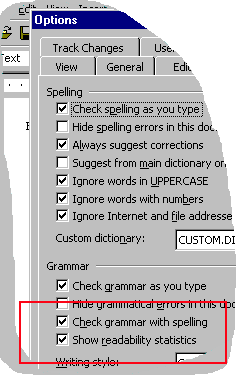
Click on "Check grammar with spelling."
Click on "Show readability statistics."
Click on "OK" to accept the changes.
When you are ready to check the readability of your document,
open your document in Microsoft Word and select "Tools" from the
menu at the top of the screen. A pulldown menu will appear. Select
the "Spelling & Grammar" option. The system will check your document
and then provide a summary of the words and sentences, including the
Flesch-Kincaid Index rating.
For Word 2018 and 2018
Click on "File" on the Microsoft Word menu that goes across the top of the window.
Click on "Options."
Click on the "Spelling & Grammar" tab. You will see a window with this in it:
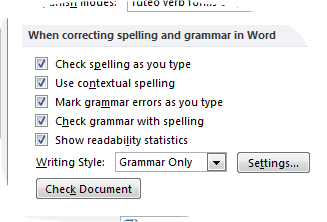
Click on "Check grammar with spelling."
Click on "Show readability statistics."
Click on "OK" to accept the changes.
When you are ready to check the readability of your document,
open your document in Microsoft Word and select "Review" from the
menu at the top of the screen. Click on the "Spelling & Grammar" option. The system will check your document
and then provide a summary of the words and sentences, including the
Flesch-Kincaid Index rating.
It will show two scores: The Flesch Reading Ease score and The
Flesch-Kincaid Grade Level score.
Flesch Reading Ease score
This score rates text on a 100-point scale. The higher the score,
the easier it is to understand the document. For most standard documents,
a score of 60 to 70 is readable by most people. A lower score is
more difficult to read.
Flesch-Kincaid Grade Level score
This score provides an approximate school level for a reader
to be able to understand the text easily. For example, a score of
8.0 means that an eighth grader might be able to understand the
document easily. Most business documents should be aimed at 7.0
to 10.0. Technical documents written for a technical audience will
have a higher grade level.
|